
Grocy Pro
Grocy for Home Assistant

Your pantry,
on your dashboard.

Stock and due dates, the shopping list as a to-do list, chores, tasks, batteries, the meal plan and Grocy's calendar. Book purchases and chores from automations, or with one tap on the included card.

Stock + due dates Shopping list to-do Chores, tasks, batteries Calendar + actions
What you get

One Grocy device with sensors, binary sensors, a to-do list and a calendar. Only the features you use in Grocy show up.

Stock at a glance

Everything in stock with amounts, best-before dates and pictures, plus alerts for expiring, overdue, expired and missing products.

Shopping list to-do

Tick items off in the supermarket, add products by name, or ask Assist. It's a regular Home Assistant to-do list.

Chores, tasks, batteries

Counts with full lists, and "overdue" binary sensors that make reminder automations a one-liner.

Calendar

Grocy's calendar (due products, chores, tasks, batteries and meals) in the Home Assistant calendar view.

Command Center card

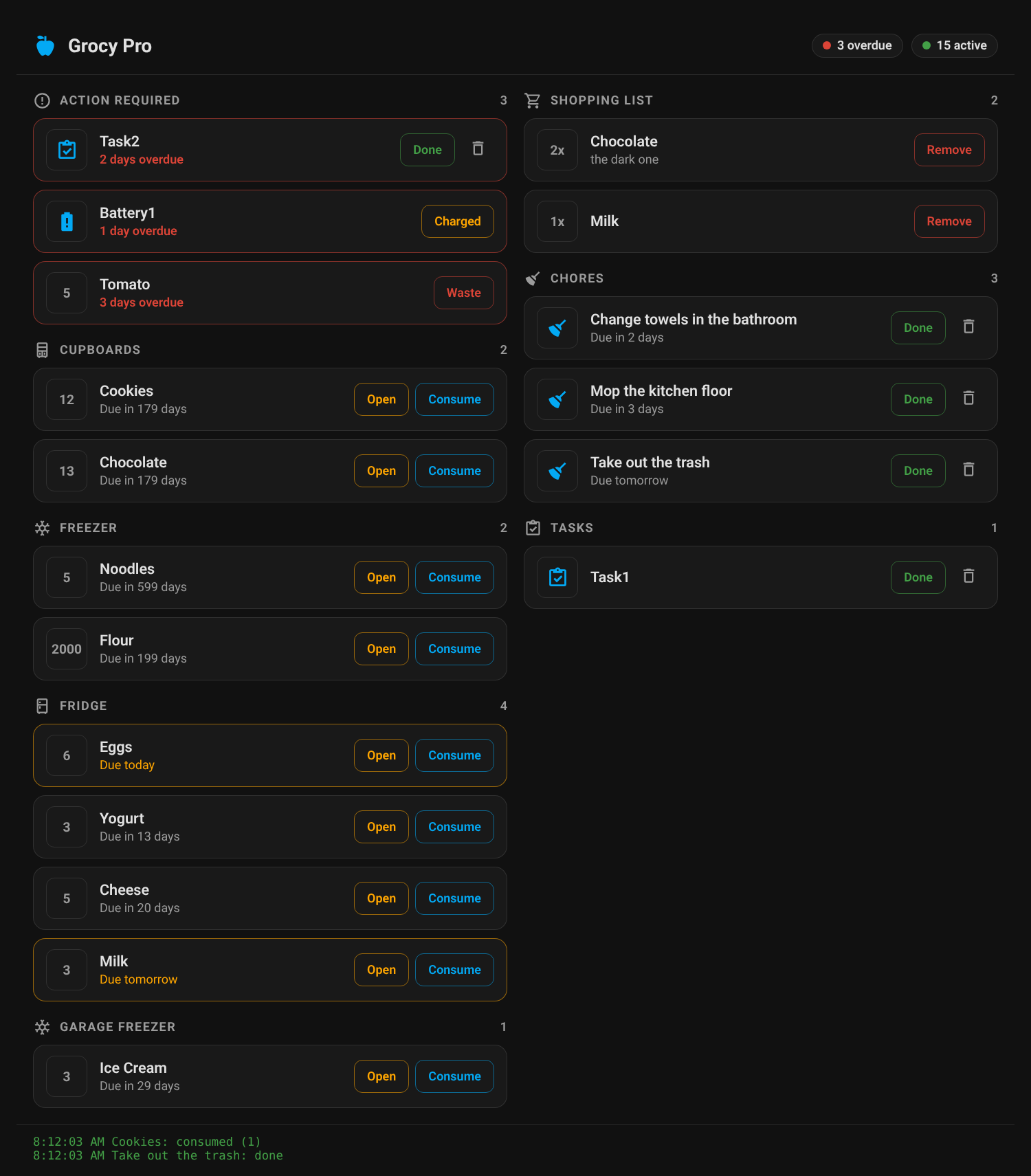
Overdue items, pantry by location, chores, tasks and the shopping list with one-tap buttons. Loaded automatically.

Light on Grocy

A tiny "has anything changed?" check every 30 seconds. Data is only downloaded when Grocy says something changed.

Entities you get

All on the Grocy device. The lists are attributes and aren't written to your history database.

sensor.grocy_stock
products in stock
sensor.grocy_shopping_list
items on the list
sensor.grocy_chores / _tasks / _batteries
counts + lists
sensor.grocy_meal_plan
meals from today
binary_sensor.grocy_*_products
expiring, overdue, expired, missing
binary_sensor.grocy_overdue_*
chores, tasks, batteries
todo.grocy_shopping_list
the shopping list
calendar.grocy_calendar
Grocy's calendar

Actions (grocy_pro.*)

add_product_to_stock · consume · open
stock bookings
add_products_by_name
a whole receipt at once
execute_chore · complete_task · track_battery
household
consume_recipe
all ingredients
add_missing_… · remove_product_in_shopping_list
shopping lists
add_generic · update_generic · delete_generic
any Grocy object
triggers:
  - trigger: tag
    tag_id: dog_food_bin
actions:
  - action: grocy_pro.consume_product_from_stock
    data: { product_id: 42, amount: 1 }
  - action: grocy_pro.execute_chore
    data: { chore_id: 15, track_execution_now: true }

A daily watcher runs the same API calls against the public Grocy demo and opens an issue if a new Grocy release breaks something.

Upgrading from 2.x

2.x used the domain grocy and the folder custom_components/grocy, the same as the original custom-components/grocy integration that HACS removed from its list. That's why HACS kept saying the repository was removed. 3.0 has its own domain, grocy_pro.

  1. Update Grocy Pro in HACS and restart.
  2. Add integration → Grocy Pro → Move my old Grocy setup. It reuses your URL and API key, removes the old entry and keeps your sensor.grocy_* entity IDs and history.
  3. In HACS, remove the entry flagged as removed (custom-components/grocy). Delete custom_components/grocy if it's still there. Restart.
  4. Change grocy.* to grocy_pro.* in automations and scripts.
  5. Remove the old /local/grocy-action-card.js dashboard resource: the card now comes with the integration.

Installation

HACS, a restart, and a Grocy API key.

HACS

  1. 1. Click Open in HACS, or add https://github.com/DonTranQuiL/grocy-pro as a custom repository (category Integration).
  2. 2. Download Grocy Pro and restart Home Assistant.
  3. 3. In Grocy: Settings → Manage API keys → Add.
  4. 4. Settings → Devices & services → Add integration → Grocy Pro, then enter the URL, API key and port (9192 for the add-on).

Dashboard card

Grocy Pro Command Center card
type: custom:grocy-action-card
title: Kitchen
locations:
  1: Pantry
  5: Garage

Full docs, examples (NFC tags, AI receipts, reminders) and troubleshooting are in the README.